

HighLevel New Guided Setup for SaaS Agencies
TLDR
- Available inside the GoHighLevel SaaS Configurator
- Checklist-based onboarding flow
- Connect Stripe
- Select billing currency
- Create SaaS plans
- Generate sale link
- Progress saved automatically
- Designed to simplify SaaS mode activation
✅ HighLevel 30-Day Free Trial
What Is the New Guided Setup for SaaS Agencies?
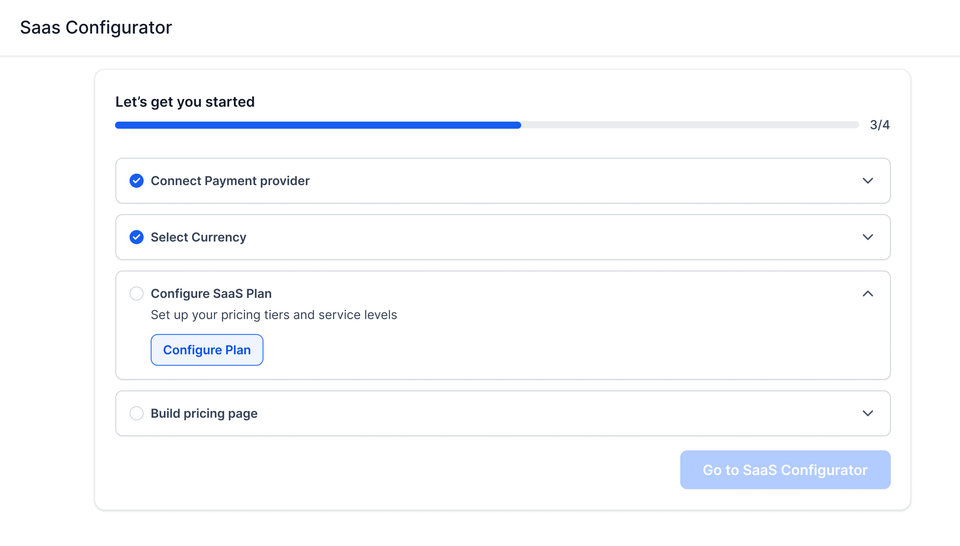
The Guided Setup is an improved onboarding experience inside the GoHighLevel SaaS Configurator.
Instead of navigating multiple configuration areas, users now see a structured checklist that walks through the required steps to launch SaaS mode.
The goal is clarity and structured execution.
This update applies to agencies enabling or configuring SaaS mode inside their Agency account.
Why This Update Matters for New Agencies and Freelancers
If you are:
- Launching your first white-label SaaS offer
- Converting from service-based freelancing to recurring SaaS revenue
- Setting up HighLevel SaaS mode for the first time
The previous configuration flow required jumping between sections.
The new guided setup centralizes the process.
It does not change SaaS functionality.
It changes the setup experience.
That distinction matters.
Skip trial and error.
Follow a proven onboarding sequence used by agencies.
What the Guided Setup Walks You Through
The checklist includes the core required steps.
1. Connect Stripe
You must connect Stripe to process recurring subscription payments.
Without Stripe, SaaS billing cannot function.
2. Select Default Currency
You define the billing currency before creating plans.
This affects subscription pricing and checkout configuration.
3. Create SaaS Plans
Inside the configurator, you:
- Define plan names
- Set pricing
- Configure included features
- Define trial options
Plans determine what subaccounts receive when they subscribe.
4. Generate Your Sale Link
Once plans are configured:
- The system generates a shareable sale link
- This link is used to sell your SaaS subscriptions
You can embed or distribute this link in funnels and landing pages.
5. Progress Is Saved Automatically
The checklist reflects completion status.
You can leave and return without losing progress.
This setup guide applies to the SaaS Pro Plan ($497/month). If you are still deciding whether the SaaS Pro upgrade is justified at your current agency stage, this plan decision guide covers the revenue thresholds and upgrade triggers. For full plan costs, see GoHighLevel Pricing Plans Explained.
What This Update Does Not Change
For clarity:
- It does not modify pricing logic
- It does not change Stripe requirements
- It does not change SaaS feature access rules
- It does not automatically create marketing funnels
It improves onboarding flow and configuration visibility.
Who Should Use the Guided Setup?
New Agency Owners
If you are activating SaaS mode for the first time, the checklist ensures you complete required billing and plan steps in the correct order.
Freelancers Moving to SaaS
If you previously sold services manually, this flow simplifies:
- Subscription setup
- Plan creation
- Billing activation
It lowers configuration friction when productizing your offer.
FAQ
Where is the Guided Setup located?
Inside Agency View under the SaaS Configurator.
Is Stripe still required?
Yes. Stripe remains required for processing SaaS subscription payments.
Does this replace SaaS mode?
No. It improves the configuration process for SaaS mode.
Can I modify plans after completing setup?
Yes. SaaS plans can still be edited inside the configurator.
Does this affect existing SaaS accounts?
Existing accounts can use the guided setup interface to manage configuration, but it does not automatically change active billing structures.