

GoHighLevel Free Trial | What You Get, How Long It Lasts and How to Claim It
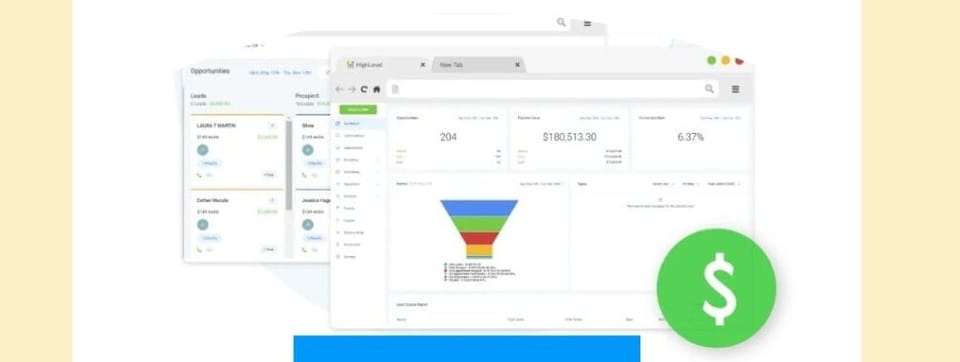
Our HighLevel free trial runs for 30 days. Not 14. Not 15. Thirty days of full platform access before you pay anything.
This page covers exactly what the trial includes, which plan to start on, and what happens when day 30 arrives.
TLDR
- GoHighLevel free trial: 30 days on all plans
- Full access to CRM, automations, funnels, calendar booking, email, SMS, and AI tools
- No feature restrictions during the trial period
- Trial starts on the Starter, Unlimited, or Pro plan - your choice
- Billing begins after 30 days; cancel anytime before that with no charge
- SaaS Mode (white-label reselling) is available on the $497/mo Pro plan trial
- The 30-day trial is only available through specific affiliate links - the standard GHL homepage offers 14 days
✅ HighLevel 30-Day Free Trial
Who This Is For
- You've researched GoHighLevel and you're ready to test it before committing
- You're comparing plans (Starter vs. Unlimited vs. Pro) and want to understand what each covers
- You want to know the billing mechanics - what you owe, when, and how to cancel
- You're an agency owner evaluating whether to resell GoHighLevel under a white-label SaaS model
The Standard Trial vs. the 30-Day Trial
Not all GoHighLevel trial links are equal.
The standard GoHighLevel homepage offers a 14-day trial. Some older links still show 15 days.
The extended 30-day free trial is available through select affiliate and partner links. That extra two weeks is the difference between running a real pilot campaign and barely finishing onboarding.
The link at the bottom of this page gives you 30 days.
Skip trial and error.
Follow a proven onboarding sequence used by agencies.
What the Trial Includes
Every GoHighLevel free trial - regardless of the plan you choose - gives you access to:
| Feature | Included in Trial |
|---|---|
| CRM (contacts, pipelines, opportunities) | Yes |
| Email and SMS campaigns | Yes |
| Automation workflows | Yes |
| Funnel and website builder | Yes |
| Calendar and appointment booking | Yes |
| AI Employee (Conversation AI, Voice AI) | Yes |
| Reputation management (review requests) | Yes |
| Reporting and attribution dashboards | Yes |
| Mobile app | Yes |
| API access | Yes |
| SaaS Mode (white-label reselling) | Pro plan only |
| Unlimited sub-accounts | Unlimited plan and above |
| White-label desktop app | Pro plan only |
No features are locked behind a "trial tier." You get the full plan you choose.
Which Plan to Start Your Trial On
GoHighLevel has three plans. The right one depends on what you are building.
| Plan | Monthly Price | Sub-accounts | Best For |
|---|---|---|---|
| Starter | $97/mo | 3 | Solo operator, single business, testing the platform |
| Unlimited | $297/mo | Unlimited | Agencies managing multiple client accounts |
| Pro (SaaS Mode) | $497/mo | Unlimited | Agencies that want to resell GoHighLevel under their own brand |
If you are testing GHL for your own business: start on Starter. Three sub-accounts is more than enough to build and test your setup.
If you run a client services agency: start on Unlimited. You need unlimited sub-accounts to mirror your real operating environment during the trial.
If you are evaluating GoHighLevel as a SaaS product to resell: start on Pro. SaaS Mode, white-label billing, and the branded client portal are only available at this tier. Testing on a lower plan will not show you the feature set that matters most.
What You Can Realistically Build in 30 Days
Thirty days is enough time to:
- Import your contacts and configure your CRM pipeline
- Build and launch at least one automation workflow (lead follow-up, appointment reminder, review request)
- Set up a funnel or landing page
- Run a live SMS or email campaign to a real segment
- Book and process real appointments through the calendar
- Test AI Employee on inbound chat or missed call follow-up
- Configure your first snapshot if you're building a client template
Most agencies complete their core setup in 10–14 days. The second half of the trial is for stress-testing with real traffic and real leads.
How to Start Your HighLevel Free Trial
- Click the trial link at the bottom of this page
- Select your plan (Starter, Unlimited, or Pro)
- Enter your business name and email
- Add a payment method - required to start, but not charged for 30 days
- Complete the onboarding wizard (takes 5–10 minutes)
- You are now inside the platform with full access
GoHighLevel sends a reminder email before your trial ends. You can cancel from inside your account settings at any time before day 30 with no charge.
What Happens at Day 30
On day 30, your payment method on file is billed for your first month at your plan's monthly rate.
If you want to cancel:
- Go to your Agency account billing settings
- Select the cancellation option
- Confirm before the billing date
Export your contacts and assets before cancelling. Here is what happens immediately on cancellation:
- Contacts, conversations, calendars, automations, and funnels: access is lost immediately
- Phone numbers and A2P registrations: deleted 14 days after cancellation - you are still billed for those numbers during the 14-day window
- Add-on subscriptions: automatically cancelled with the main subscription
- Agency data recovery: your data is retained for 90 days. You can reactivate your account within that window to recover everything. On day 91, all data is permanently and automatically deleted.
If you want to downgrade (e.g., from Unlimited to Starter): do this before billing triggers. Plan changes made mid-cycle take effect at the next billing date.
 Zoltan Juhasz
HighLevel Free Trial FAQ
Does GoHighLevel really offer a 30-day free trial? Yes - through select partner and affiliate links, including the one on this page. The standard GoHighLevel.com homepage defaults to 14 days. The 30-day version is the same full trial, just with an extended window.
Do I need a credit card to start the trial? Yes. GoHighLevel requires a payment method to activate the trial. Nothing is charged until day 31.
Can I cancel before the trial ends? Yes. Cancel any time before day 30 in your Agency billing settings. No charge applies.
Which plan should I trial if I want to resell GoHighLevel? Pro plan ($497/mo). SaaS Mode - the feature that lets you white-label the platform and charge clients subscription fees - is only available on Pro. Testing on Starter or Unlimited will not show you how SaaS Mode works.
Is there a GoHighLevel discount or coupon code? GoHighLevel does not publish coupon codes for ongoing discounts. Promotional pricing (typically 20–40% off for 1–3 months) appears around Black Friday and Cyber Monday. The standard 30-day free trial is the most reliable offer available year-round and is equivalent to saving your first month's fee.
What happens to my contacts and data if I cancel? GoHighLevel retains your agency data for 90 days after cancellation. On day 91, all data is permanently deleted. During those 90 days you can reactivate your account and recover everything. Note: access to contacts, conversations, calendars, automations, and funnels is lost immediately on cancellation - the 90-day window is for recovery via reactivation, not for continued access. Phone numbers and A2P registrations are deleted 14 days post-cancellation; you are still billed for those numbers during that 14-day window. Export all critical data before cancelling.
Can I switch plans during the trial? Yes. You can upgrade or downgrade during the 30-day window from Agency Settings > Billing. Upgrades take effect immediately. Downgrades take effect at the next billing cycle.
Is GoHighLevel free trial available outside the US? Yes. GoHighLevel is available globally. Billing processes in USD. GDPR compliance for EU/EEA users is the account holder's responsibility.
What's New in HighLevel
Workflow Version History Now Works Across Both Builders
GoHighLevel's Workflow Version History now supports versions created in either the Standard or Advanced builder. When you restore a version, the platform automatically switches to the correct builder for that version - no manual switching required. For trial users building and iterating on automations, this means you can experiment freely without losing previous versions.
Stripe ACH Direct Debit - Compliance Update (Action Required by March 20, 2026)
Stripe is tightening requirements for ACH Direct Debit to align with Nacha operating rules. If your agency or any of your sub-accounts accept US bank account payments through GoHighLevel via Stripe, you need to update your Stripe account settings before March 20, 2026. The update requires you to specify how Stripe classifies your bank payment transactions so customers can identify your business on bank statements. Check your Stripe dashboard and connected sub-accounts now if ACH payments are part of your billing setup.