

ClientBloom and GoHighLevel | Practical Retention Playbook
TLDR / Goal
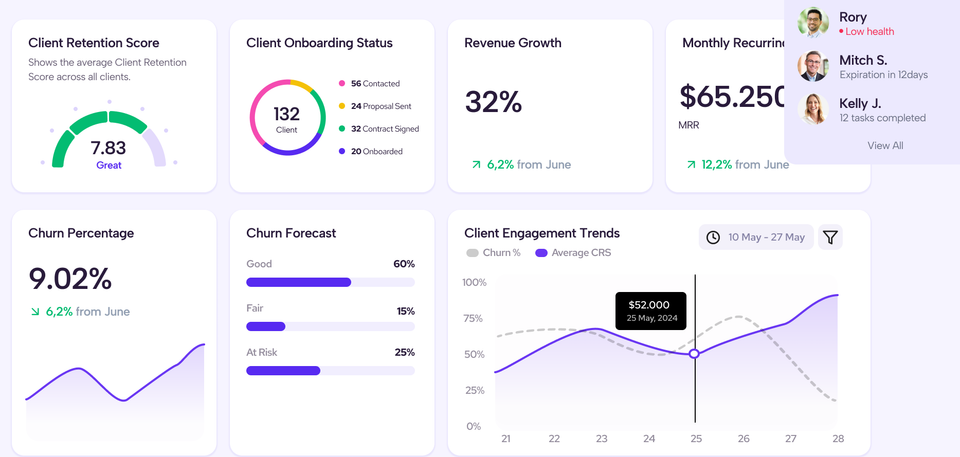
Use HighLevel for CRM, automation, billing reminders and client activity logging, feed that data into ClientBloom, and run targeted retention actions from GHL when ClientBloom flags risk. ClientBloom claims this reduces avoidable churn by converting scattered signals into a single, actionable retention score.
Book a free demo with ClientBloom
What ClientBloom actually does — fact checked
- Client Retention Score: ClientBloom calculates a single score per client from behavioral signals so you know which accounts need attention. This is the product promise on ClientBloom’s site.
- Signal sources: The vendor states it ingests activity patterns, message volume, onboarding progress, payment disruptions and support interactions to predict risk. That is consistent across ClientBloom marketing and LinkedIn posts.
- Demo and workshops: ClientBloom advertises demos and retention workshops to show the system in action and to teach calculating churn cost. Bookings and a workshop page are live on the site.
Why this pairs with HighLevel
- GoHighLevel runs your CRM, automations, appointment funnels, messaging, pipelines and billing reminders. ClientBloom adds a monitoring layer that converts GHL events into retention signals, then surfaces priority accounts to your ops team. Use GHL to execute corrective actions suggested by ClientBloom.
Simple mapping example:
| GoHighLevel signal | ClientBloom input | Outcome |
|---|---|---|
| Missed recurring invoice | Billing disruption | Higher churn risk |
| Drop in portal logins | Engagement dip | Trigger check-in |
| Open support ticket not resolved | Support friction | Escalate CS task |
Expanded automation blueprint
- ClientBloom flags Account A as at-risk — score drops 20 percent in 7 days.
- ClientBloom sends an alert to GHL via webhook or integration hook.
- GHL triggers a sequence:
- Create a task assigned to CS lead, due in 24 hours.
- Send a personalized check-in SMS and email summarizing last month’s outcomes.
- Drop a calendar link for a 15-minute health call.
- If no response in 72 hours, trigger an upgrade or discount offer for one billing period.
- CS documents the call in GHL notes, which feeds back into ClientBloom, closing the loop.
Goal: create a 7–30 day intervention window to recover momentum, clarify expectations and surface operational blockers.
Where ClientBloom delivers ROI — numeric example
Assumptions:
- Average recurring contract: 950 CAD monthly.
- Prevented cancellations per year: 4 accounts.
- Average months retained per recovered account: 9 months.
Recovered revenue = 4 × 950 CAD × 9 = 34,200 CAD.
Even with conservative adjustments to predicted retention improvements, the recovered revenue typically outpaces the marginal cost of a retention tool for agencies with more than ~12 recurring clients. This math depends entirely on your current churn rate and contract values, so run the exact numbers before committing.
How to test ClientBloom with minimal risk
- Select 8–15 active recurring clients with full data in GHL.
- Confirm these clients have: invoices, logged messages, notes and at least two months of activity history.
- Run a pilot for 60–90 days. Track:
- Number of client risk alerts generated.
- Actions taken from GHL automations.
- Cancelled accounts compared to baseline.
- Change in average retention period.
- Evaluate cost per recovered CAD versus tool subscription cost and staff time.
If the pilot shows frequent false positives, audit the inputs in GHL first — poor or missing activity logs are the main cause of noisy alerts.
SOP steps to operationalize retention signals
- Assign a Retention Owner. This person reviews alerts daily and triages them.
- Standardize note-taking in GHL: date, action, result. These notes feed ClientBloom.
- Create three fixed checkpoints: Week 2 onboarding, Day 45 satisfaction check, Quarterly review. Automate reminders in GHL.
- Weekly sprint: close top 10 at-risk accounts with documented outcome.
Retention improves only when signals map to specific actions and those actions are measured.
Risks and limitations
- Garbage in, garbage out: if Highlevel data is incomplete, ClientBloom scores are unreliable.
- New tool overhead: you add a vendor to manage and a new alert stream to triage. Make sure the Retention Owner has capacity.
- Claims vs reality: marketing materials promise easy wins; validate with a short pilot and actual metrics.
FAQ
Does ClientBloom replace GoHighLevel?
No, it is a monitoring and scoring layer. GoHighlevel remains the execution and automation engine.
Is it worth it for solo consultants?
Under ~6 recurring clients, manual retention checklists outperform a dedicated platform. Start small.
How fast will this work?
You should see meaningful signals in 30–90 days if your GHL activity logging is consistent.
Publisher note:
ClientBloom aggregates engagement, billing and support signals to surface an AI Client Retention Score, letting agencies using GoHighLevel trigger targeted retention workflows before cancellations occur.
This post is built from ClientBloom marketing pages, LinkedIn posts and workshop pages.
For integration specifics and pricing confirm with ClientBloom sales. (ClientBloom)